Stretch, inflate, shrink, and paint all stay until you reset. Drag the background (or anywhere, with Turn) to turn the head, and pinch (or Ctrl+scroll) to zoom. Drag with two fingers (or with the right mouse button, or Shift) to slide the view a little; Reset brings it all back. In fullscreen, plain scrolling zooms too. The glasses ride along when you reshape the face. Nothing is saved; refresh and the face goes back to normal.
How it's made
Everything here runs live in your browser with Three.js (WebGL), at about 60 frames a second on a recent phone. Some backgrounds are videos, but the head never is: it's a 3D model, lit and shaded every frame. Here's what goes into it.
The model
The head was generated by Meshy, an AI 3D model generator, from four views of me. My own selfies weren't clean or straight enough to work from, so I had an AI image model turn a handful of them into a consistent set of studio portraits first, and gave Meshy the front, the back, and both profiles. Four clean views worked better than more, rougher ones.
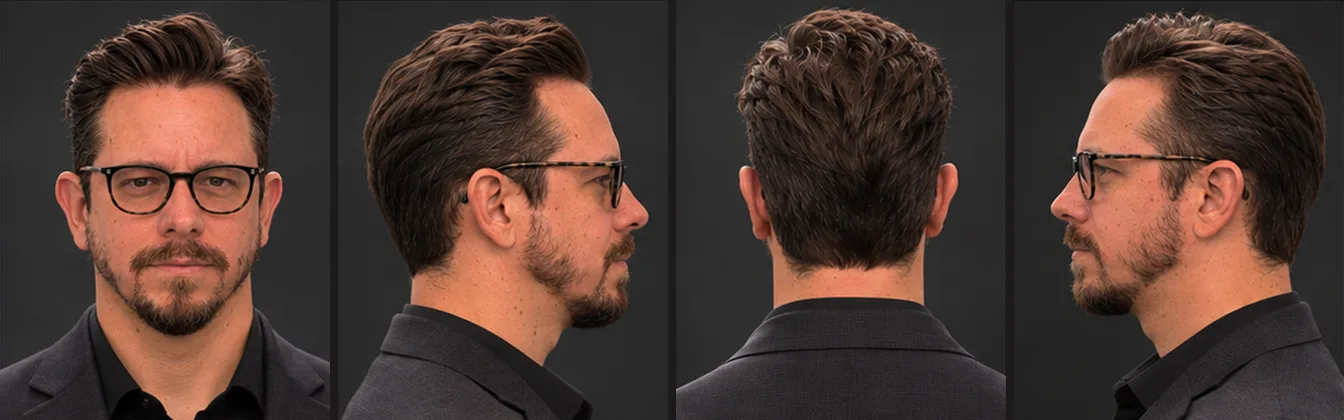
That gives a textured mesh of about 38,000 triangles, but not a clean one, so a build script fixes it before it reaches the page:
- Hole repair: fills gaps where you could see into the head (in Blender, scripted).
- Glasses: the generator fused the frames onto the face, so the build cuts them free into their own object (with their own shadow) and patches the skin underneath. It also slims the frames, which came out thick, and repaints the lower rims as tortoiseshell like the real ones.
- Shape: compared with photos of me, the nose came out about 10% too wide and sat too flush with the mustache, so it's narrowed and the top of the upper lip is set back a few millimeters.
- Texture fixes: removes streaks and the frame marks painted onto the skin, fades the beard's hard edge into stubble, and shades the scalp under the hair.
- Eyes: the eyes were painted matte with grey irises; they get a wet, glossy finish, a curved cornea, round brown irises like mine, pupils that react to light, and eyelids that blink (more under Eyes, below).
- Lenses: the generator only made frames, so the script traces the inside of each rim and fits a flat glass lens to it.
- Three detail levels: Low, Medium, and High versions with smaller or larger textures, compressed for the web (about 2 to 5 MB).
Lighting and shadows
Each scene is a set of lights: a key light (the main one), a rim light behind the head to pick out the hair and ears, and a fillso the shadow side doesn't go black. Most of them belong to the place: in the Cinema the key light is the screen, in Noir the glass door, in the Fall the sun through the leaves, by the Fireplace the fire, low and in front of him to one side, so one side of the face glows orange and the other falls into shadow, and in the Rain one street lamp beside him, hard, so half his face falls into shadow, as in film noir, with the lamps across the square catching his wet hair from behind.
When you turn the head, the place turns with it, as if he'd turned on the spot, so the light keeps coming from where it is in the room: turn him round in Noir and he looks out of the door that's lighting him. Nothing turns on its own: leave him be and the room and its light stay put.
The main lights cast real shadows. Without them, a light behind the head would still reach every hair it pointed at, and the hair would fill with bright specks. With them, the head blocks the light the way a real head does, and only the edges catch it.
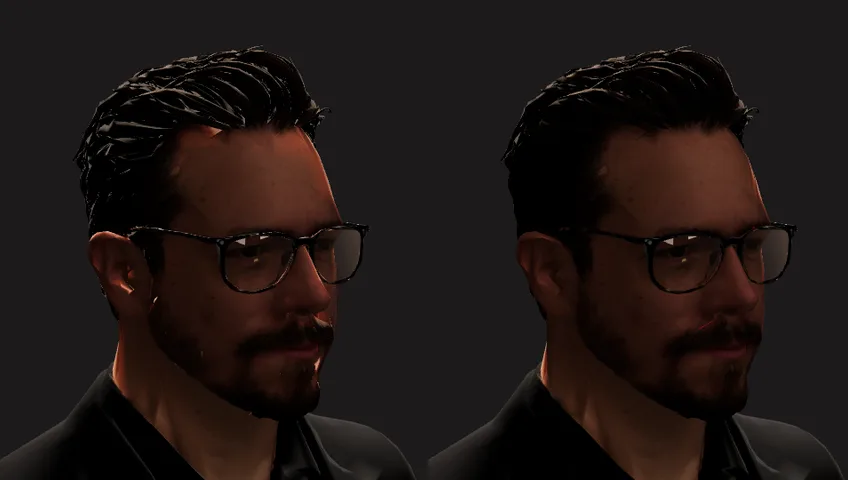
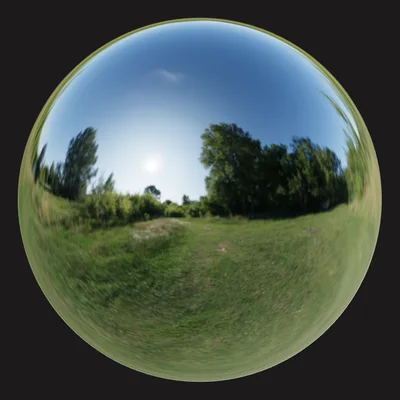
Five scenes use photo worlds: a 360° HDR photograph of a real place, from Poly Haven (the Studio, the Fireplace, the Cinema, Noir and the wet town square in the Rain). The photo lights the head with the colors of that place and shows up in the glasses. The background is the same photo, unrolled into a strip around the head, blurred like a portrait lens and baked into an image ahead of time, so it costs nothing to draw.
Two of them are in black and white, like old film: Noir, and the Rain, a rainy night that's pure film noir. Their backdrops are baked in grey, the head is drawn in color and turned grey on the way to the screen (with a little extra contrast in the Rain, for the wet highlights), and pictures you save from them come out the same. Only the finished picture is turned grey: the skin, the light through his ears and everything else is lit exactly as in color, so the head looks the same in every scene, whatever its palette. Over both runs a fine film grain that jumps a dozen times a second, like film through a projector, with darker corners. The Cinema has a lighter grain too, since you're watching a film there.
The Cinema is also shot like a film, with a shallow depth of field: his eyes are sharp, and his ears, the side of his head turning away and his shoulders go a little soft, as on a portrait lens. Grab, slap or paint somewhere and the focus slides there over about half a second, the way a camera operator pulls focus, then drifts back to his eyes a moment after you let go. It's done after the head is drawn: the head is drawn again into a small image of how far each point is from the focus, and the patch of screen round it is blurred by that, each pixel gathering from a small disc round it. A point only spreads as far as its own blur reaches, and one behind can't spread over a sharper one in front, so a sharp edge (the glasses against a soft ear) stays sharp, with no halo, while a soft one fades into the room behind.
One more moves: its world is a 360° video, unrolled the same way into a strip of video (kept sharp) and looped, the last second fading into the first. One frame of it is the light. The Black hole is NASA Goddard's simulated flight past a supermassive black hole (Jeremy Schnittman and Brian Powell): its glowing disk of gas, bent by gravity into an arch over the black shadow, the way it looks in Interstellar. The camera flies in, loops round it twice and escapes. The disk's orange light comes from behind the head and rises and falls with the video.
In the Cinema the film on the screen is the trailer for Sintel (© Blender Foundation, CC BY 3.0), a short muted video fitted to the screen's shape. It is also the light: every frame it is shrunk to a few pixels, and their color and brightness light the face, so a snowy shot lights him cold and white and the fire lights him orange.
Noir's light is the corridor's glass door, cut out of the photo itself and projected onto the face like a slide, so the shadow of its frame falls across him. Sheer curtains blow in the draft in front of it: the folds that dim the light on his face are drawn from the same numbers as the curtains you see over the door when you turn him round, so the two move together.
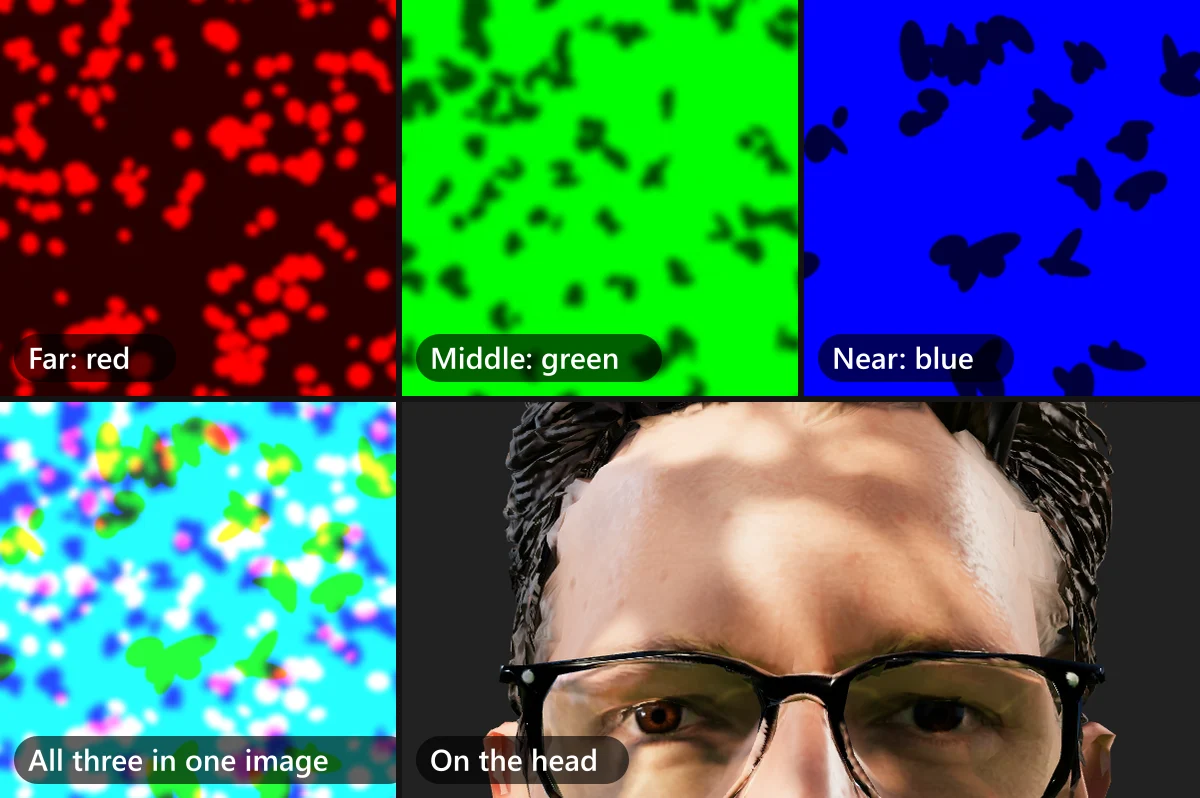
In the Fall, the sun comes through leaves. In a real canopy, leaves near you cast crisp shadows, leaves far away cast soft ones, and the tiny gaps high up project round blurry spots of sun. So the pattern is three layers baked into one image, one per color channel: the far canopy (mostly shade with soft round spots of sun), the middle branches (medium soft), and a few near leaves (crisp). The shader multiplies them together, and each layer sways on its own, slower far away and quicker close by, like branches at different heights in the wind. Baking the blur ahead of time means it looks the same in every browser and costs the phone nothing.
Skin (subsurface scattering)
Skin isn't opaque like paint. Light goes a little way in, bounces around under the surface, and comes back out somewhere else, tinted red by blood. That's subsurface scattering, and it's most of why skin looks alive instead of plastic. Two cheap versions of it run here, the same way for every light in every scene:
- Warm shadow edges: where the face turns away from a light, the light reaches a little further and goes warm red, instead of the hard grey edge of plain lighting.
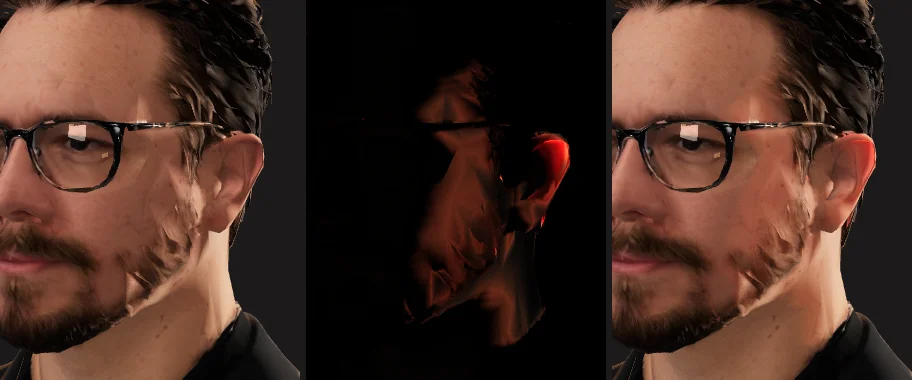
- Light through thin parts: with a light behind the head, the ear rims glow red. A precomputed thickness map says how thin each spot is, and the light's shadow is checked on the far side, so the ears glow but the nose doesn't light up from inside when the head is in the way.
The glow is the light's color filtered by blood, which lets red through and absorbs green and blue. So warm light makes ears glow red, and blue light barely gets through, just like a real ear.
Hair
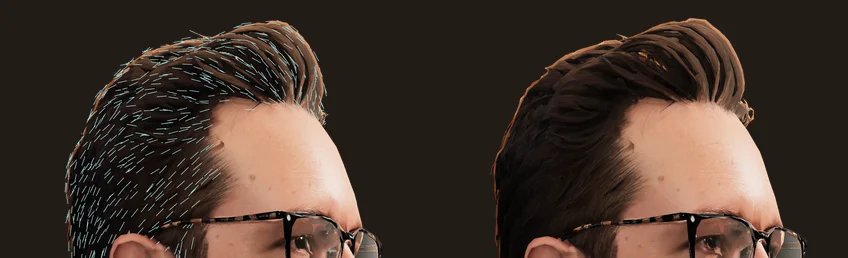
Meshy's hair isn't strands: it's a solid surface shaped into tufts, with strands painted onto it. Lit like skin, that reads as a plastic helmet with a broad, round shine. Real hair shines differently, because it's made of thin fibers: each one reflects light in a cone around its own length, so a head of hair catches a narrow band of light running across the strands, and the band slides as the light moves.
- Strand highlight: the shader lights the hair the way fibers reflect (the Kajiya–Kay model from film rendering), with two highlights like real hair: a sharp white one from the surface of each strand, and a broader one tinted by the hair's own color, from light that went into the strands and came back out.
- Which way the hair runs: that highlight needs the direction of the strands at every point, and the model doesn't have one. The build measures it from the painting itself, the way hair-capture research and fingerprint scanners read the direction of fine lines: at every spot of the hair texture it finds the direction the streaks run, carries that onto the 3D surface, and averages it over a few centimeters, across the seams of the texture, until it settles into locks.
- Layers: light reaches the inner layers of hair through the outer ones, so the build measures how deep each point sits in the hair, and the inner layers are shaded darker. The hair gets depth without dark lines painted between strands.
- Backlight: with a light behind the head, thin hair at the edges lets light through and glows warm, the way hair lights up against the sun.
Eyes
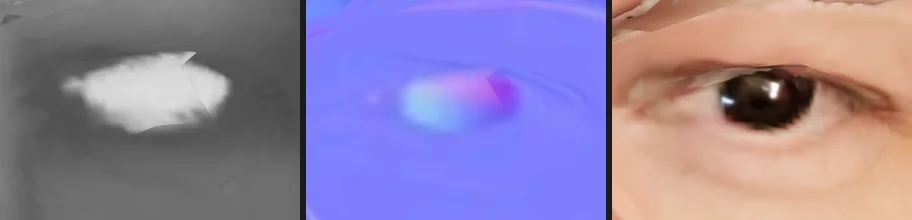
Eyes are where people look first, and Meshy painted them flat: matte, like the skin, with grey irises and a reflection baked into the paint. The model has no separate eyeballs, just the face's surface across the eye opening, so everything here is done in the textures and the shader.
- Wet: a film of tears makes real eyes as smooth as glass. The gloss map marks the eye opening as very smooth, so the lights show as sharp catchlights instead of a dull sheen.
- Curved: the face is nearly flat across the eye, and a flat mirror only catches a light at one exact angle. The bump map adds the bulge of the cornea, so some point on it always faces a light and each eye keeps a small catchlight as the lights move.
- Round irises: Meshy painted lopsided, oval irises with no clear pupil. The build finds where each iris is and measures a circle around it, and the shader draws the iris itself there: dark brown like mine, with fibers running out from the pupil, a darker ring at the edge, and a perfectly round black pupil.
- Small details: the waterline, the wet pink rim of the lower lid, and the caruncle, the small pink mound in the inner corner, are both tinted and glossy, so the white of the eye doesn't run straight into dry skin.
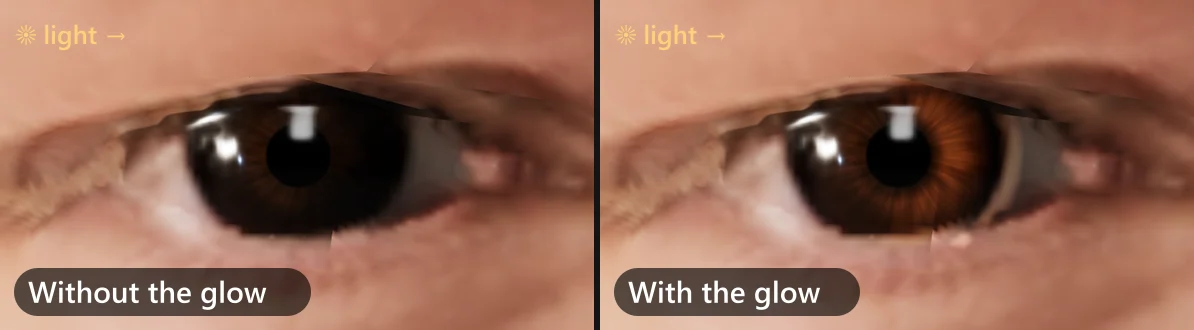
The cornea is also a lens. When a strong light comes from the side, it focuses that light onto the far side of the iris, which lights up in a warm glow that shows its fibers: brightest at the iris's outer edge and fading toward the pupil, while the side nearest the light stays dark. Brown eyes go amber or honey-colored there. The white of the eye is translucent, like skin, so a little of that light also scatters into it and glows warm just outside the iris. It's strongest with side or low light (Noir's window, the fireplace, the sun through the leaves in the Fall) and gone when the light is straight in front, so the shader adds it per light, on the side of the iris away from that light.
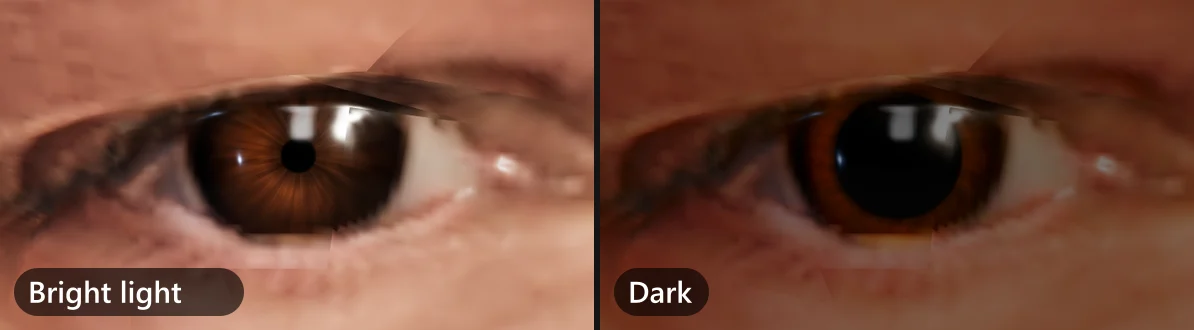
Pupils react to light like real ones. Every frame the page adds up how much light reaches the eyes from all the scene's lights, and the pupils narrow in bright light and open wide in the dark. Real pupils take a few seconds to adjust and ease in and out rather than changing at a steady speed, and so do these, over about five seconds: switch from Studio to Noir and watch them open.
Blinking happens every few seconds at random, sometimes twice in a row, and takes about a fifth of a second like a real one: the lid drops fast and lifts a little slower. Like the iris, the lid is drawn by the shader over the eye, sliding down from the crease and meeting the lower lid at the lash line. Its skin comes from photos of my own closed eyes: their color, plus bump and gloss maps made from them, cropped to just the lids and fitted to each eye's opening. The lid follows the head's surface, so it stays put when you stretch the head.
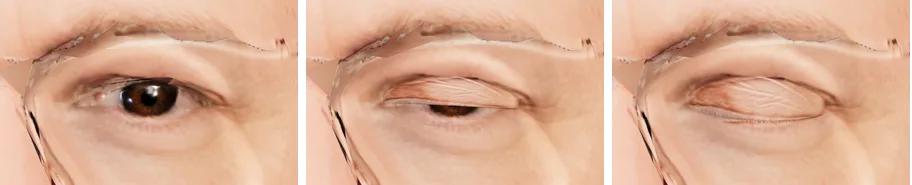
The eyes also look around. Real eyes never rest for long: they jump from point to point a few times a second, in quick hops rather than smooth glides. These make small, quick glances at random, and on a computer they follow your pointer while it's over the head. The drawn iris moves within the eye, and the white of the eye from beside it fills in where it was.
Breathing and movement
A head that holds perfectly still looks like a statue, even with perfect lighting. So it moves a little, the way a person does when they're just standing there:
- Breathing: about 13 breaths a minute, in quicker than out. The chest and shoulders rise and the head lifts and tips back very slightly with each breath.
- Drift: the head sways by a degree or so, made of a few slow waves that never quite line up, so it never repeats.
- Looking: when the eyes glance or follow your pointer, the head turns that way too, by a few degrees and more slowly, the eyes leading and the head catching up.
- Only the head: the whole model turns together, so the shader turns the shoulders back the other way, easing in down the neck, and the head moves on the neck while the body stays put.
It all settles while you're grabbing or using a tool, so the head holds still under your hand, and it's off if your device asks for reduced motion.
Tools and points
The head's surface is a net of about 40,000 points, and the tools move them, recolor them, or hurt and heal them. What they do stays until Reset; the glasses ride along, each point of the frames tied to the points of the face nearest it.
- Stretch: grab the face and the points near your finger follow it, less and less further away, and when you let go most of it stays, while the rest springs back with a little wobble, like rubber.
- Inflate and Shrink: a wide, round brush pushes the surface out or sucks it in, faster the longer you hold, all in one smooth direction so even the rough beard bulges cleanly. It slows as it nears its limit, so a puffed cheek stays round instead of flattening on top. After every change, the lighting is worked out again only where the surface moved.
- Paint: brushes straight into the face's texture, so the paint bends and stretches with the skin. The texture is the face cut into flat pieces, and neighbors on the face can be far apart in it, so where a stroke crosses a seam, the page splits the path on screen and looks it up again until the line carries on across.
Slap works by how you touch: a swipe across the face is a slap that way, harder the faster you swipe, and a tap is a punch, straight in. Each one:
- Moves the skin: the points around the impact get a kick on a spring, so the cheek jiggles and settles back by itself, and a few waves roll out over the face from it, raised and lowered and catching the light (in the shader, so they cost almost nothing).
- Moves the head: a slap turns it along the swipe, a punch knocks it back, on a bouncy spring; the eyes squeeze shut, and the first moment plays in slow motion, like a replay.
- Hurts: a red mark that fades into a bruise over ten seconds or so, purple-blue in the middle, darker with every hit in the same place, and a lump that swells up. A hit near an eye bruises the whole socket into a black eye; one on the mouth gives a fat lip, swelling out and down on the side that was hit. The first hit on the glasses knocks them crooked, the next knocks them off.
- Sounds: made on the spot, no sound files: a slap is a sharp crack of noise, a punch a low thud.
Heal sticks a cartoon band-aid on a hurt spot, painted into the texture so it bends with the skin, and what's under it heals over a second and a half: the bruise fades, a black eye opens back up, the lip goes down. A hit where there's a band-aid knocks it off, and it tumbles away.
Inflate too far and the head pops: it strains, wobbling and squeaking higher and higher, then bursts into bits with a bang and grows back as new. A slap or punch on a part that's well blown up pops it at once.
Points follow one rule: fun that hurts no one scores, and hurting costs. Every slap or punch costs a little, a black eye or the glasses a bit more; healing earns more than hurting cost, and healing everything earns a Doctor bonus. Popping the head, a huge stretch and painting a lot of it (a Van Gogh) score too. Scores in quick succession build a combo, up to five times. The best is kept on your device; Reset starts the count over.
Glass
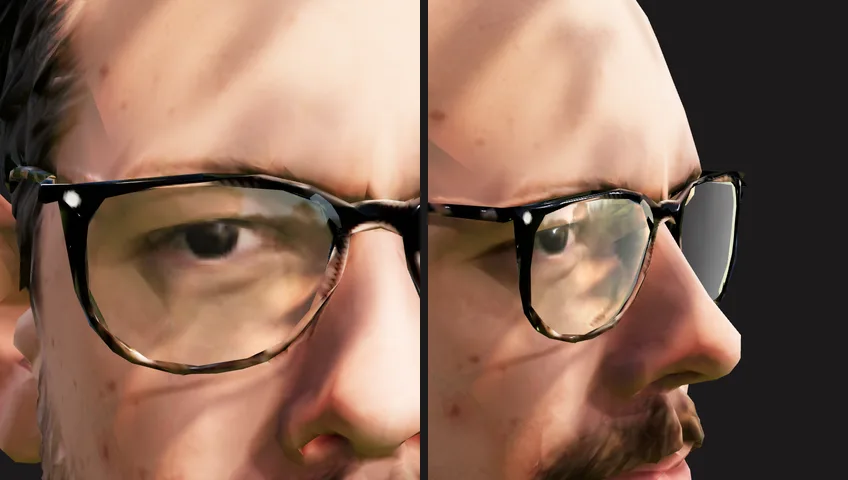
Each lens is a single flat piece (a fan of 64 triangles fitted to the inside of the rim). The curved look comes from shading: the lens is lit as if its surface tilted away toward the rim, so reflections slide across it like on a real lens, and a faint bright band at the edge suggests the thickness of the glass.
Glass reflects more the more sideways you look at it: you see straight through a window head-on, but it turns into a mirror at a glancing angle. That's the Fresnel effect, exaggerated a little here so the lenses read as glass. What they reflect is the current scene: the window in Studio, the screen in Cinema, the sky outdoors.
Toward the rim, what you see through the glass picks up thin colour fringes: a red edge on one side of the frame's inner edge, the lashes and the face's outline, and a blue edge on the other. Glass bends blue light a little more than red, and away from its centre a lens acts like a weak prism, so what's behind splits into slightly offset red and blue images: nothing in the middle, widest at the rim. Just before the lenses are drawn, the page copies the patch of screen round them, and each point of the glass looks into that copy for its red a little inward and its blue a little outward. (Seen from outside, the eye sits so close behind the glass that it would barely shift at all, so this is exaggerated a little to show.)
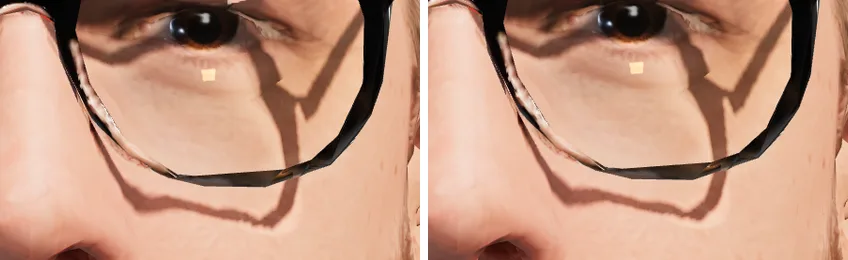
Glasses also bend light onto the skin. A lens is thicker at the edge (or thinner, depending on the prescription), so the light that passes through near the rim gets pushed sideways and piles up into a bright line just inside the frame's shadow, with a slightly darker band next to it where that light went missing. The shader traces a line from each point of skin to each light, checks whether it crosses a lens and how close to the rim, and adds that ring. The further the skin is from the lens, and the bigger the light, the wider and softer the ring gets, just like a shadow's edge: crisp from a small, sharp light, a soft glow from the campfire. Its brightness drops off steeply with that distance, more than real optics would, so it's vivid on the cheek right under the lens and gone a few centimeters away. It's capped so it never blows out.
Rain and water
In the Rain it rains on him, at night in Hamburg's town hall square, its cobbles wet and shining with the lamps (Rathaus, by Greg Zaal, Poly Haven), baked looking down a little to take in the wet ground. 900 thin streaks fall all round the head, moved by the graphics chip (see below for why some glow), fading out right in front of the camera, where a streak would be a long bright line across the picture. The water on his face, hair and glasses isn't painted on: each drop is lit as water.
Each drop is a little dome of water. The shader treats it as a cap of a sphere sitting on the surface and works out which way its surface faces at every point. That gives it its own sharp highlight from each light (shadowed like the skin, so a drop in the shadow of the nose doesn't sparkle) and a reflection of the street around it, strongest at its edge, where water turns mirror-like (the Fresnel effect again). Through the drop the skin shows magnified, darkening toward the steep edge, where the water bends your view out to the dark around it: that dark rim is most of what makes a drop read as a bead. And a drop is a lens: it gathers the light into a bright spot on the skin on the side away from the light.
On the glasses what's behind the glass is really refracted. The head is solid, so it's already on screen when the lenses are drawn; just before that, the page copies the screen into a texture, and each drop looks into the copy through its dome. Your eye and cheek show through it small and upside down, the way the street does through a drop on a window. The copy is quick: only the patch of screen round the glasses (the same one their colour fringes look into).
The drops on the glasses also cast light onto the face. Each is a tiny lens, so the light through it is focused into a bright spot on the skin behind, ringed by a shadow where its steep edge bent the light away. The same trace that draws the bright line inside the frame's shadow (under Glass) finds where each light's path crosses the lens, and checks whether a drop is there; the spots soften the farther the skin is from the glass, and slide down your cheek as the drops run down the lens.
How the water moves follows the physics of drops on a slope. A drop is held by its edge sticking to the surface, a grip that grows with its width, while gravity pulls on its weight, which grows with its volume, much faster. So small drops stay put and only big ones run: rain lands on a bead and it grows, or merges with a neighbor, until it passes a critical size; then it breaks loose, sweeps up the beads in its way and leaves a thin wet trail with a few tiny beads on it. How big depends on the surface (the balance is the Furmidge equation). Clean glass grips weakly, so drops on the lenses run often and smoothly. Skin is rough and a little oily and grips harder, so fewer drops run, and slowly, a centimeter or two a second, stop-start: they catch every few millimeters, then lurch on. The beads they swept up grow back.
In the hair water behaves differently again. Hair repels water, so rain sits on the strands as small round beads, drawn out a little along them (the strand directions measured for the highlight, under Hair). Water that soaks in creeps along the strands to their ends, so where hair gives way to skin and the strands point down (under the mustache, along the bottom of the beard) drops gather and hang, grow for a few seconds, and fall. A drop running down the skin stops when it reaches hair. To tell hair from skin the shader looks at the texture's color a few steps blurrier, so a whole drop is judged at once rather than strand by strand.
Wet things go darker. Dry hair and cloth look lighter than they are because the gaps between fibers scatter light straight back out, white. Water fills those gaps, so more light soaks in and what comes back has gone deeper: darker and richer. So his hair, beard and jacket darken in the rain, as well as shine; skin barely changes.
Rain shows against the light. A raindrop scatters light mostly forward, which is why rain is hard to see lit from behind you but glows in a halo round a street lamp. The falling streaks brighten where they're between you and the lamps across the square behind him.
His breath shows in the cold. Each breath out, a faint puff of fog leaves from under his nose, pushed forward and down by the breath, then slows, spreads and rises (it's warm), and is gone in a couple of seconds: soft, see-through sprites, flat images that always face you, with a wispy texture. Where his nose is comes from where his eyes are, so it works for any face.
With sound on, you hear the rain, made on the spot like the slap: random noise shaped into a soft hiss (countless small drops) over a low rumble (heavier ones on the ground), and now and then a drop close by, a quick falling ping.
It all lives in the head's own coordinates, so the drops stay on him as he turns, and move with his skin when you stretch it. Nothing is drawn for them: they're worked out in the shader for each pixel of the head.
The Matrix
The Matrix scene turns him into code. The shader replaces his shading with green, keeping the face lit and readable, with columns of glyphs falling over it, each at its own speed, the leading glyph white-hot, and a glow around his edges.
The digital rain is 3D, all round the head: four rings of falling glyph columns, from just behind him out into the distance. Each ring is an open cylinder drawn by its own shader from a sheet of mirrored glyphs; every column falls at its own speed with a bright head and a fading trail, and glyphs flicker now and then. The rings turn with the head, so turning him shows the depth: the near rain sweeps past faster than the far.
His glasses reflect it. A small camera at the head sees only the rain, every fourth frame, and its view is what the lenses mirror. They're also made a little clearer than usual: reflecting a mostly black world, full-strength glass would just darken his eyes.
Ambient occlusion
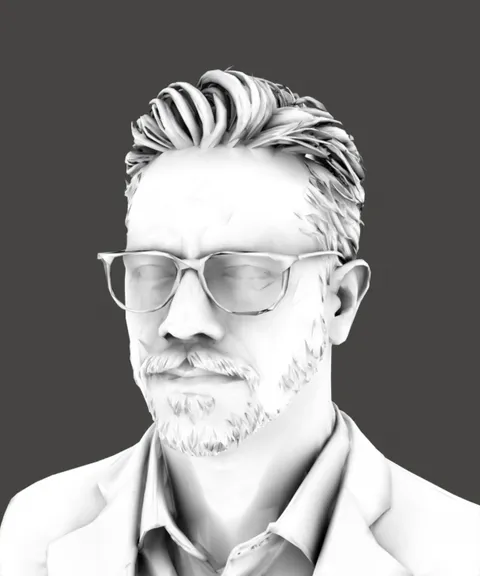
Besides the main lights there's soft light coming from everywhere: the room, the sky. Real creases and openings (nostrils, the corners of the eyes, the folds of the ear) get less of it, because the face around them blocks most directions. Ambient occlusion is a map of how buried each spot is, computed once ahead of time in Blender, so those places stay darker in every scene.
Keeping it fast
Auto detail measures the frame rate in 5-second windows and adapts: first fewer pixels, then a lighter model, and back up again when things are smooth. The line under the head shows what's active, for example Scene: Studio (auto) · Detail: Medium (auto) · 1080×1350 px · 60 fps. "(auto)" means the page chose that setting rather than you (on phones it's shortened, with * for auto).
The biggest costs are the number of pixels (every one runs the full skin and shadow math) and the shadows (each shadow-casting light draws the head one extra time per frame). The lenses cost almost nothing, even in the rain, where the screen is copied once a frame for the drops to look through.
The background videos are about 1 to 2.5 MB each, at a low resolution (most are blurred anyway). Each loads only when its scene is picked, only one plays at a time, and it stops when you leave the scene.
Glossary
- WebGL / Three.js
- WebGL lets a web page use the graphics chip directly; Three.js is the library that builds a 3D scene on top of it.
- Mesh
- A 3D surface made of small triangles; the head is about 38,000 of them.
- Texture
- An image wrapped onto the mesh: here, the skin, hair, and frame colors.
- Normal map
- A texture of tiny surface angles that adds detail like pores and hair strands without more triangles.
- Shader
- A small program the graphics chip runs for every pixel to decide its color; the skin, glass, and Matrix effects are shader code.
- Shadow map
- A picture of the scene from a light's point of view, used to tell which spots that light can't reach.
- Subsurface scattering (SSS)
- Light entering a material, spreading inside it, and coming out elsewhere; why skin, wax, and marble glow softly.
- Fresnel effect
- Surfaces reflect more at glancing angles than head-on; why a lake mirrors the sky in the distance.
- Refraction
- Light bending as it passes from one material into another, like air into water; why a drop shows what's behind it upside down.
- Contact angle
- How steeply a drop's edge meets a surface: shallow on surfaces water likes, steep (a rounder bead) on ones it doesn't, like hair.
- Ambient occlusion (AO)
- How much of the surrounding soft light reaches a point; creases and holes get less.
- HDR / environment map
- A 360° image that stores real brightness (a sun far brighter than a wall), used to light objects and give them reflections.
- Depth of field
- A camera focused on something close blurs what's far behind it; the backgrounds are blurred this way, so the head stands out like in a portrait.
- 360° video
- Video filmed in every direction at once and stored flat, like a map of the world; the moving backgrounds are cut from it.